
 Module 5
Capstone: Multimodal Supplier Risk Intelligence
Apply every concept from Modules 1-4 in a single end-to-end system: ingest daily news, audio, and satellite data about suppliers, cluster risk signals into themes, and surface what local-language sources are saying before it reaches English media.
Today’s path
- Project Overview
- System Architecture
- Signal Sources & Embedding Models
- Ingestion Pipeline
- Clustering Risk Signals
- Cross-Language Risk Queries
- Knowledge Check
- Course Summary
- References & Further Reading
By the end, you’ll have built a working Qdrant pipeline: ingest, embed, cluster, and query multimodal signals across languages.
1. Project Overview
Supply chain risk is invisible until it isn’t. A factory fire in Vietnam, a labor dispute in Bangladesh, a regulatory change in China: these events appear as signals across dozens of data sources, in different languages, in different modalities, before they become formal incidents. The goal of this project is to make those signals retrievable before the incident.
This is the news search system you designed in Module 4, extended along two dimensions: more modalities (audio and imagery alongside text) and a new capability (clustering signals into risk themes). The five design questions from Module 4 already gave you the blueprint. Now you build it.
- Daily Signals: News, earnings calls, satellite images, factory footage, ingested every 24 hours.
- Clustering: Group signals by supplier, topic, and risk theme using vector proximity.
- Cross-Language Queries: Ask in English, retrieve what Japanese and Chinese sources are saying.
2. System Architecture
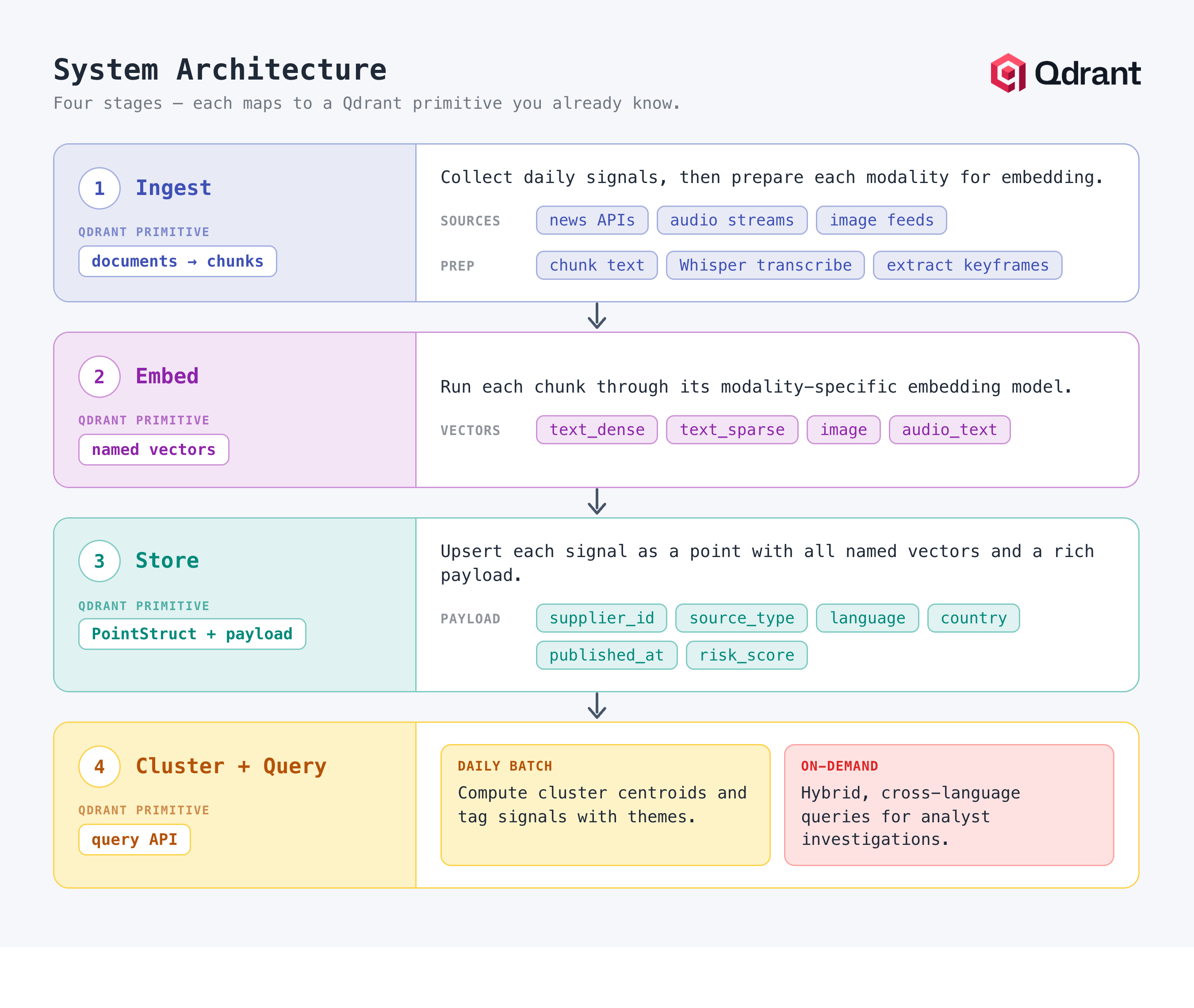
The system has four stages. Each maps to Qdrant primitives you already know.
- Ingest: Collect daily signals from news APIs, audio streams, and image feeds. Chunk text, transcribe audio via Whisper, extract keyframes from video.
- Embed: Run each chunk through its modality-specific embedding model. Produce named vectors: text_dense, text_sparse, image, audio_text.
- Store: Upsert each signal as a PointStruct with all named vectors and a rich payload: supplier_id, source_type, language, country, published_at, risk_score.
- Cluster + Query: Daily batch: compute cluster centroids and tag signals with themes. On-demand: hybrid, cross-language queries for analyst investigations.
Collection Schema
One collection holds all modalities. Named vectors allow querying by text, image, or audio from the same point. Indexed payload fields make all filters fast, exactly as you designed in Module 4.
Collection: supplier_signals

Named vectors:
  text_dense    -> multilingual-e5-large (1024-dim, Cosine)
  text_sparse   -> BM25 (Qdrant/bm25)
  image         -> CLIP (512-dim, Cosine)
  audio_text    -> Whisper -> MiniLM (384-dim, Cosine)

Payload fields:
  supplier_id   string   (indexed)
  source_type   string   text | image | audio | video
  language      string   (indexed)
  country       string   (indexed)
  published_at  datetime (indexed)
  risk_score    float    0.0 - 1.0
  cluster_id    integer  assigned post-ingestion
  summary       string   short excerpt / caption
3. Signal Sources & Embedding Models
Each signal type requires a different embedding approach. The key principle: choose a model trained on data similar to your domain, and use the same model at query time as at ingestion time.
| Signal source | Modality | Embedding model | Payload fields |
|---|---|---|---|
| News articles | text | multilingual-e5-large | supplier_id, country, language, date, risk_score |
| Earnings calls | audio -> text | Whisper + MiniLM | supplier_id, quarter, sentiment, date |
| Factory footage | video -> frames | CLIP per keyframe | supplier_id, facility_id, alert_type, timestamp |
| Satellite imagery | image | CLIP / ResNet | supplier_id, facility_id, region, capture_date |
| Financial filings | text | fin-e5 or MiniLM | supplier_id, filing_type, fiscal_year, currency |
| Social / forums | text | multilingual-e5-large + BM25 | supplier_id, platform, language, date, severity |
Multilingual Text: Why multilingual-e5-large
Supply chain news arrives in Japanese, Mandarin, Korean, Vietnamese, Hindi, and dozens of other languages before it reaches English. This is the knowledge-layer decision from Module 4’s Question 4, now in action: multilingual-e5-large (1024 dimensions) projects all of these into the same vector space. A query in English surfaces relevant articles originally written in Japanese, without translation.
You don’t need to read Japanese to verify this - the gloss (a literal English translation, shown here only so the example is checkable) makes it clear the two texts share meaning, even though the model itself never sees the gloss:
from sentence_transformers import SentenceTransformer

# Same model for all 100+ languages
text_model = SentenceTransformer("intfloat/multilingual-e5-large")

# English query finds Japanese-language articles
query_vec = text_model.encode("supplier factory fire evacuation")

# At ingestion: Japanese article embedded with the same model
# text_model.encode("工場火災下の経営者声明")
# Gloss (for verification only, not passed to the model): "Executive statement following factory fire"
# Cosine similarity between these two vectors: ~0.81
Audio: Transcribe then Embed
Earnings calls, analyst briefings, and supplier press conferences arrive as audio. Whisper transcribes them to text; a sentence transformer then embeds the transcript. The audio_text named vector captures spoken risk signals that never appear in written news.
import whisper
from sentence_transformers import SentenceTransformer

asr_model  = whisper.load_model("base")
text_model = SentenceTransformer("sentence-transformers/all-MiniLM-L6-v2")

def embed_audio(audio_path: str):
    transcript = asr_model.transcribe(audio_path)["text"]
    chunks     = chunk_text(transcript, size=500, overlap=100)
    return [
        {
            "text":   chunk,
            "vector": text_model.encode(chunk).tolist(),
        }
        for chunk in chunks
    ]
Images and Video: CLIP Embeddings
Satellite imagery of supplier facilities and factory footage are embedded using CLIP (Contrastive Language-Image Pre-training). CLIP projects both images and text into the same vector space, enabling text-to-image queries like “smoke above factory” against satellite photos.
import torch
from PIL import Image
from transformers import CLIPProcessor, CLIPModel

clip_model     = CLIPModel.from_pretrained("openai/clip-vit-base-patch32")
clip_processor = CLIPProcessor.from_pretrained("openai/clip-vit-base-patch32")

def embed_image(image_path: str) -> list[float]:
    image  = Image.open(image_path)
    inputs = clip_processor(images=image, return_tensors="pt")
    with torch.no_grad():
        features = clip_model.get_image_features(**inputs)
    return features[0].numpy().tolist()  # 512-dim vector

def embed_text_for_image_query(text: str) -> list[float]:
    inputs = clip_processor(text=[text], return_tensors="pt", padding=True)
    with torch.no_grad():
        features = clip_model.get_text_features(**inputs)
    return features[0].numpy().tolist()
4. Ingestion Pipeline
The daily ingestion job collects signals, embeds each modality, and upserts them as points with all named vectors. A risk scoring model assigns an initial risk_score to each point based on keyword and model signals; analysts use it later as a filter field.
Collection Setup
import os
from qdrant_client import QdrantClient, models

client = QdrantClient(
    url=os.getenv("QDRANT_URL"),
    api_key=os.getenv("QDRANT_API_KEY"),
)

client.create_collection(
    collection_name="supplier_signals",
    vectors_config={
        "text_dense": models.VectorParams(size=1024, distance=models.Distance.COSINE),
        "image":      models.VectorParams(size=512,  distance=models.Distance.COSINE),
        "audio_text": models.VectorParams(size=384,  distance=models.Distance.COSINE),
    },
    sparse_vectors_config={
        "text_sparse": models.SparseVectorParams(),
    },
)

# Create payload indexes for all frequently-filtered fields
for field in ["supplier_id", "language", "country", "source_type"]:
    client.create_payload_index(
        collection_name="supplier_signals",
        field_name=field,
        field_schema=models.PayloadSchemaType.KEYWORD,
    )
client.create_payload_index(
    collection_name="supplier_signals",
    field_name="published_at",
    field_schema=models.PayloadSchemaType.DATETIME,
)
Upserting a Multimodal Point
import uuid
from qdrant_client.models import PointStruct

def ingest_news_article(article: dict):
    text_dense_vec  = text_model.encode(article["text"]).tolist()
    text_sparse_vec = bm25_encode(article["text"])   # {indices, values}
    risk_score      = score_risk(article["text"])    # 0.0 - 1.0

    client.upsert(
        collection_name="supplier_signals",
        points=[
            PointStruct(
                id=str(uuid.uuid4()),
                vector={
                    "text_dense":  text_dense_vec,
                    "text_sparse": text_sparse_vec,
                },
                payload={
                    "supplier_id":  article["supplier_id"],
                    "source_type":  "news",
                    "language":     article["language"],
                    "country":      article["country"],
                    "published_at": article["published_at"],
                    "risk_score":   risk_score,
                    "summary":      article["text"][:300],
                },
            )
        ],
    )

def ingest_satellite_image(image_path: str, meta: dict):
    image_vec = embed_image(image_path)
    client.upsert(
        collection_name="supplier_signals",
        points=[
            PointStruct(
                id=str(uuid.uuid4()),
                vector={"image": image_vec},
                payload={
                    "supplier_id":  meta["supplier_id"],
                    "source_type":  "satellite",
                    "facility_id":  meta["facility_id"],
                    "published_at": meta["capture_date"],
                    "risk_score":   meta.get("risk_score", 0.0),
                },
            )
        ],
    )
5. Clustering Risk Signals
Clustering groups signals that discuss the same underlying risk event, even when they come from different sources, languages, or modalities. A factory fire will appear in Japanese news articles, an English satellite alert, and a Chinese social media post. Clustering surfaces them as a single event.
The Clustering Approach
- Daily centroid computation: For each supplier, compute the mean vector of all signals ingested in the last 24 hours. This becomes the daily centroid for that supplier.
- Cluster assignment: Retrieve the day’s vectors with scroll, run a lightweight k-means over them, and assign a cluster_id to each point via payload update.
- Cross-supplier clustering: Run clustering across all suppliers to find shared risk themes: “port congestion in Southeast Asia” may affect 15 suppliers simultaneously.
Retrieving Signals for a Supplier
from datetime import datetime, timedelta
from qdrant_client.models import Filter, FieldCondition, MatchValue, Range

def get_supplier_signals_last_24h(supplier_id: str):
    yesterday = (datetime.utcnow() - timedelta(hours=24)).isoformat()

    results = client.scroll(
        collection_name="supplier_signals",
        scroll_filter=Filter(
            must=[
                FieldCondition(key="supplier_id", match=MatchValue(value=supplier_id)),
                FieldCondition(
                    key="published_at",
                    range=Range(gte=yesterday),
                ),
            ]
        ),
        with_vectors=True,   # need vectors to compute the centroid
        limit=1000,
    )
    return results[0]  # list of points

def compute_centroid(points) -> list[float]:
    import numpy as np
    vecs = [p.vector["text_dense"] for p in points if "text_dense" in p.vector]
    return np.mean(vecs, axis=0).tolist() if vecs else None
Writing Cluster IDs Back to Payload
import numpy as np
from sklearn.cluster import KMeans

def cluster_and_tag(supplier_id: str, n_clusters: int = 5):
    points    = get_supplier_signals_last_24h(supplier_id)
    vecs      = [p.vector["text_dense"] for p in points
                 if p.vector and "text_dense" in p.vector]
    point_ids = [p.id for p in points
                 if p.vector and "text_dense" in p.vector]

    if len(vecs) < n_clusters:
        return  # not enough signals to cluster meaningfully

    km     = KMeans(n_clusters=n_clusters, n_init=10)
    labels = km.fit_predict(np.array(vecs))

    # Write cluster_id back to each point's payload
    for point_id, label in zip(point_ids, labels):
        client.set_payload(
            collection_name="supplier_signals",
            payload={"cluster_id": int(label)},
            points=[point_id],
        )
6. Cross-Language Risk Queries
The most actionable early signals are often the ones that appear in local-language sources before they reach English media. Because every language lives in the same vector space, surfacing them is a retrieval task, not a translation project.
Querying Across Languages
With multilingual-e5-large, a risk analyst can query in English and retrieve the most relevant signals regardless of which language they were originally written in. No translation required at query time.
def cross_language_risk_query(supplier_id: str, query_en: str, languages: list[str]):
    """
    Query in English; retrieve signals in any specified language.
    Useful for finding what local sources are saying about a supplier
    that hasn't surfaced in English news yet.
    """
    query_vec = text_model.encode(query_en).tolist()

    return client.query_points(
        collection_name="supplier_signals",
        query=query_vec,
        using="text_dense",
        query_filter=models.Filter(
            must=[
                models.FieldCondition(
                    key="supplier_id",
                    match=models.MatchValue(value="SUP-7291"),
                ),
                models.FieldCondition(
                    key="language",
                    match=models.MatchAny(any=languages),
                ),
            ]
        ),
        limit=10,
        with_payload=True,
    )

# Example: find Japanese and Chinese signals about this supplier's factory
results = cross_language_risk_query(
    supplier_id="SUP-7291",
    query_en="factory shutdown production halt",
    languages=["ja", "zh"],
)
The Analyst Investigation Query
For focused investigations, combine everything: hybrid retrieval over dense and sparse vectors, scoped to one supplier, restricted to elevated-risk signals from the last week. This is the Module 4 production query pattern running on multimodal data.
def query_supplier_risk(supplier_id: str, query_text: str):
    query_vec    = text_model.encode(query_text).tolist()
    query_sparse = bm25_encode(query_text)
    cutoff       = (datetime.utcnow() - timedelta(days=7)).isoformat()

    return client.query_points(
        collection_name="supplier_signals",
        prefetch=[
            models.Prefetch(query=query_vec,    using="text_dense",  limit=50),
            models.Prefetch(query=query_sparse, using="text_sparse", limit=50),
        ],
        query=models.FusionQuery(fusion=models.Fusion.RRF),
        query_filter=models.Filter(
            must=[
                models.FieldCondition(
                    key="supplier_id",
                    match=models.MatchValue(value=supplier_id),
                ),
                models.FieldCondition(
                    key="risk_score",
                    range=models.Range(gte=0.5),
                ),
                models.FieldCondition(
                    key="published_at",
                    range=models.Range(gte=cutoff),
                ),
            ]
        ),
        limit=10,
    )
Comparing Narratives Across Languages
A useful analyst workflow: run the same query twice, once filtered to English sources and once to local-language sources, and compare what comes back. If English coverage of a supplier looks routine while Japanese and Chinese sources return signals about shutdowns or disputes, the local-language narrative is ahead of the English one, and that gap is exactly where early warnings live. The mechanism is nothing new: it’s the same cross-language query with a different language filter.
7. Knowledge Check
These questions cover the capstone. Work through each before considering the course complete.
Q: Why does the supplier risk system use multilingual-e5-large instead of a monolingual English model?
A: Supply chain risk signals appear in local-language sources (Japanese, Mandarin, Korean, Vietnamese) before they reach English media. multilingual-e5-large projects 100+ languages into the same vector space, so an English query retrieves semantically relevant articles originally written in any language, without translation at query time.
Q: Why does the collection use named vectors instead of one collection per modality?
A: A single signal (one point) can carry text, image, and audio evidence about the same event. Named vectors keep them on the same point, queryable independently or together, with one shared payload for filtering. Separate collections would fragment the same event across systems and triple the filtering logic.
Q: How does CLIP make the query “smoke above factory” match a satellite photo with no text attached?
A: CLIP is trained on image-caption pairs and projects both images and text into the same vector space. The text query and a visually matching image land close together in that space, so cosine similarity retrieves the image directly.
Q: A supplier’s English coverage looks routine, but the same query filtered to Japanese and Chinese sources returns shutdown-related signals. What does this tell you, and what makes the comparison possible?
A: The local-language narrative is ahead of the English one, which is where early warnings usually appear first. The comparison works because the multilingual model embeds all languages into one vector space, so the same English query is meaningful against sources in any language, and the language payload filter scopes each run.
Q: How would you extend this system to detect a new risk theme that affects 15 different suppliers simultaneously?
A: Run cross-supplier clustering over all signals from the last 24-48 hours without filtering by supplier_id. A shared risk theme forms a tight cluster across multiple suppliers’ signals, and the cluster centroid represents the emerging narrative.
Q: Why does the analyst investigation query use hybrid retrieval rather than dense-only?
A: Analyst queries mix semantic intent (“production disruption”) with exact tokens (supplier codes, facility IDs, ticker symbols). Dense captures the intent; sparse pins the exact tokens; RRF fuses both, exactly as in the Module 4 news system.
8. Course Summary
This module completes the Qdrant Beginners course. Here’s what was covered across all five modules:
| Module | Theme | Key concepts covered |
|---|---|---|
| Module 1 | Understand Search | Why keyword search fails; how embeddings and semantic search work; the shift from words to meaning. |
| Module 2 | Anatomy of a Vector | Collections, points, vectors, payloads, HNSW, chunking strategies, and the full ingestion pipeline. |
| Module 3 | Sparse, Dense & Hybrid | BM25 vs embeddings; when each fails; hybrid search with RRF fusion; multimodal search basics. |
| Module 4 | Designing a System | The layers of the stack; five design questions; filtering in depth; the RAG pipeline; deployment options. |
| Module 5 | Multimodal Supplier Risk | End-to-end capstone: ingest news, audio, and images; cluster risk signals; query across languages. |
The same six primitives, recombined
Collection · Point · Vector · Payload · Index · Query
Every system in this course, and every system you’ll build, is a combination of these.
9. References & Further Reading
Multimodal Search Tutorial - Multimodal Search - Qdrant
- Text + image search with CLIP embeddings and named vectors: the foundation of the image pipeline in this project.
Hybrid Search Reference - Hybrid Queries - Qdrant
- Prefetch, FusionQuery, RRF, and DBSF in the Qdrant API.
Payload Indexes - Indexing - Qdrant
- How to configure keyword, datetime, float, and geo payload indexes for fast filtering.
Filtering Reference - Filtering - Qdrant
- Full filter syntax used throughout the capstone, including MatchAny and datetime ranges.
multilingual-e5-large - multilingual-e5-large - Hugging Face
- Model card: training data, languages supported, benchmark results, and usage examples.
OpenAI CLIP - clip-vit-base-patch32 - Hugging Face
- Model card for CLIP, used for image and satellite embedding in this project.
End of Module 5. Qdrant Beginners Course complete.